Introducing Threshyr Studio 1.2.1: Your Day, in Blocks
Threshyr 1.2.1 measures your workday in focus blocks, separates idle from off time, and brings complete mathematical consistency to your active hours.

Unlimited clients, unlimited projects, and unlimited tracking.
Free to use during pre-release. No account, no card, no sign-up required.
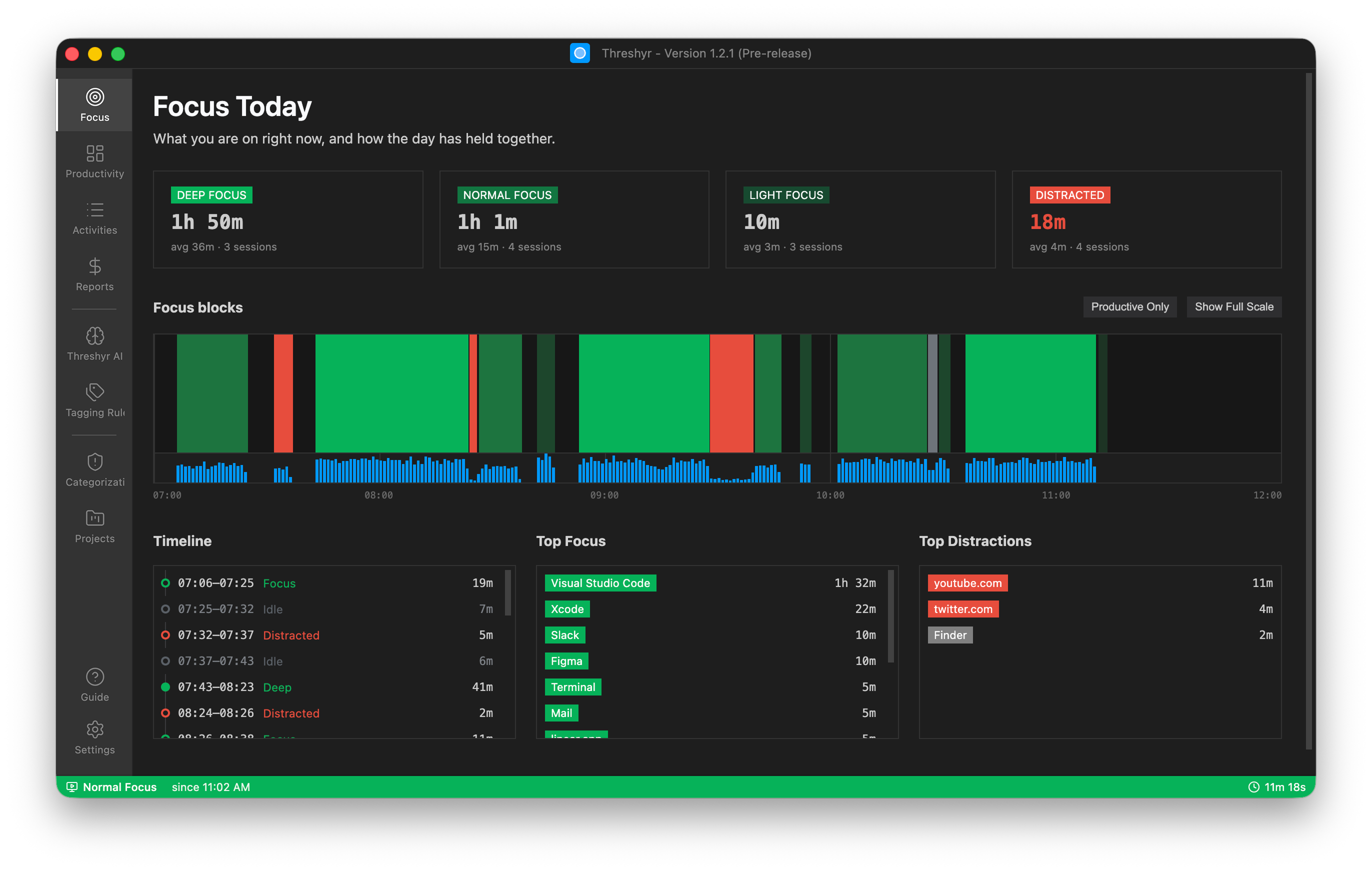
Work naturally across your apps and URLs. Threshyr automatically maps your productive hours, detects idle time, and builds your daily timeline without demanding your attention.
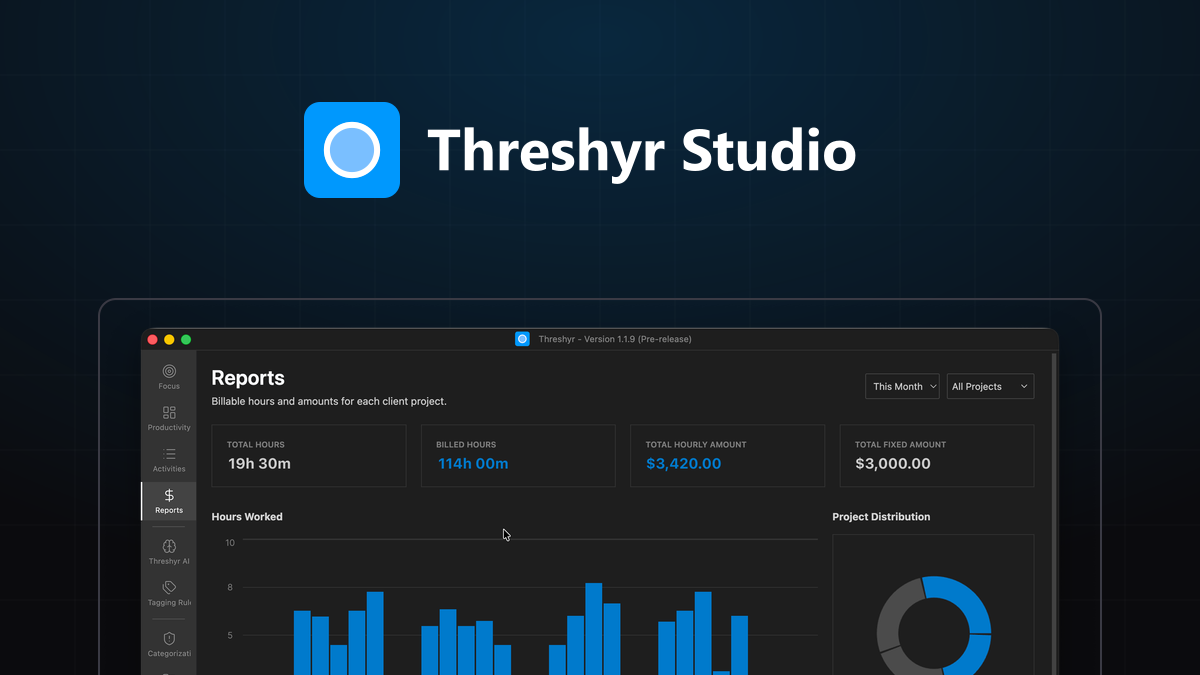
Eliminate piecing together what you worked on. Custom tagging rules separate shared tools between clients, calculate what you're owed, and generate exportable billing summaries in one click.
Enjoy the speed and security of a 100% offline desktop app. Your data never touches a remote server, and you get full access to every feature with simple yearly pricing instead of monthly recurring fees.
Threshyr quietly logs your activity for every app & URL and classifies these activities based on keywords, apps, and URLs tagged with each of your projects.
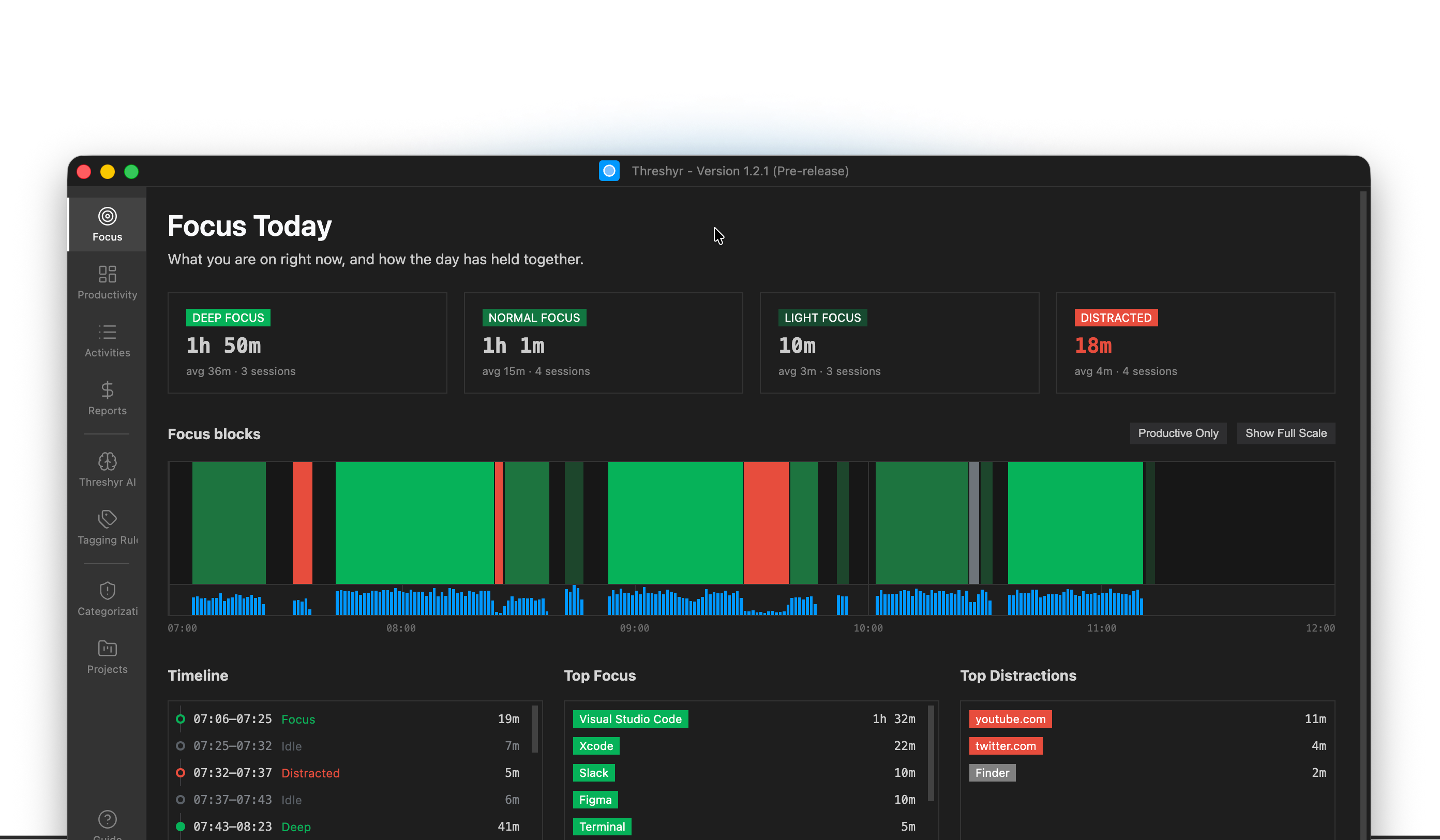
Deep, normal, light, distracted. Threshyr sorts the day into focus blocks as it happens, so you can see the stretches that held and the ones that broke.The interruptions you never remember by evening are all there, timed, next to the work they interrupted.
Try it yourselfWhether you’re paying monthly for Toggl, Harvest, Clockify, or Rize, calculate your real annual savings by switching to a private, local-first tracker.
 Toggl Track
 Threshyr
Runs 100% offline • No cloud accounts • Zero subscription lock-in
Automatic, offline and private time tracking. No cloud, no sign-up, and no monthly subscriptions.
For students, researchers, and coursework.
Completely free to download and use forever. No account, no card, no time limit.
For freelancers, solo developers, and contractors.
Everything you need to track projects, clients, and billing without paying a cent.
Built for power creators, boutique agencies, and high-volume client workflows.
Lock in your first year now for $29 (50% off the $58 launch price). You save $29 today.
Straight answers about privacy, automatic tracking, offline AI, and how Threshyr fits into your day.
Threshyr is the last time tracker you'll ever install. It is an intelligent, privacy-first, affordable, and offline desktop time tracker for Windows and macOS. It runs quietly in the background, automatically categorizes the apps and websites you use, and classifies your activity without manual timers or cloud dependencies.
Threshyr is designed for anyone who wants to understand their computer usage, is in need of a personal time tracker that is not overpriced, desires to be as productive as possible, and is fed up with paying for monthly subscription SaaS products that are cloud dependent.
Threshyr is built by Affan Bajwa, a product designer and developer with over 8 years of experience building and designing software products. Holding a degree in Computer Science (BS-CS), Affan began his career as a .NET desktop application developer before transitioning into Graphic & UI/UX design, uniting technical systems engineering with user-first design craftsmanship.
Since starting his freelance career in 2016, Affan has contributed to taking numerous products from initial concept to active users including platforms like StockIntel, GovBuddy, EasyBMV, RareOS, TontineTrust, and Behtari. Beyond desktop and web applications, he has also developed and published mobile games as a creative hobby.
Throughout his freelance career, Affan tested virtually every time tracker available, yet each tool consistently fell short—cluttered with manual timers, cloud dependencies, or overpriced monthly subscriptions. That firsthand frustration inspired him to build Threshyr: an effortless, offline, and privacy-respecting tracker designed to solve those exact problems.
Threshyr is built because we are all tired of how modern software treats users. You shouldn't have to remember to click a timer every 20 minutes, create yet another account with a password you'll forget, or send confidential window titles to a remote cloud server. And you certainly shouldn't have to pay $10-$20 every single month—through busy quarters and slow rainy days alike—just to see how you spent your time. Threshyr is local-first, runs silently in the background without logins, processes AI on-device without token fees, and charges a single fair yearly price. Simple, private, and built to last.
Right now, yes — completely. During pre-release you can download Threshyr and use every feature without paying, without creating an account, and without entering a card. There is no trial timer counting down, and nothing is held back behind a purchase.
Threshyr Edu and Threshyr Pro are 100% free forever. Threshyr Studio is available during pre-release for $29/year for the entire year (50% off the $58/year regular price), unlocking automatic time tracking, on-device AI classification, productivity metrics, and priority support.
Threshyr is created based on the mission that not everything has to be a monthly subscription, not everything has to be in the cloud, and the benefits of AI workflows should be passed on to the users also. These direct structural savings should be passed on to the users instead of marking up monthly software subscriptions.
These are uncertain times and more uncertainty lies ahead. Threshyr eliminates monthly subscriptions to free you from recurring subscription fatigue. A single, transparent yearly plan keeps our incentives aligned with building long-term software quality rather than locking you into endless monthly micro-transactions.
Other trackers come with corporate employee surveillance, cloud-dependent SaaS pricing, overpriced monthly subscriptions that keep going up, manual start and stop timers, multiple-tier pricing with essential features locked in high tiers, credit-based expensive AI features, and much more. But Threshyr is built exclusively for personal productivity. You get zero manual timers, a fully offline, lightweight on-device AI activity classification engine, 100% private data that never leaves your machine, and no monthly subscription fatigue.
Your data is stored exclusively on your local computer in a fast, private SQLite database. Threshyr is 100% local-first — there are no remote servers, no cloud backups, and no external syncing. Your time tracking data stays entirely on your drive and never leaves your machine.
No. Threshyr never tracks your workflow, user behavior, or application activity. The desktop app records no keystrokes, captures no screenshots, logs no document titles to the cloud, and contains zero behavioral analytics. The only background signal is an anonymous daily ping used solely to check for app updates.
No. Threshyr requires zero accounts, passwords, or email registrations. You simply download, install, and start tracking immediately. There are no logins to manage, no email spam, and your usage remains completely anonymous.
Threshyr provides pinpoint accuracy by combining deterministic keyword rules (matching specific app window titles) with smart app categorization. Shared applications like VS Code or browser tabs split cleanly between client projects with second-by-second precision, and idle detection automatically pauses when you step away.
Threshyr uses lightweight, on-device machine learning models that execute directly on your local CPU and GPU. Unlike cloud AI tools that transmit your window titles and private project names to external servers, Threshyr categorizes your workflow locally with zero latency, zero cloud costs, and zero data leakage.
Threshyr ships with a built-in offline dictionary of thousands of desktop apps and websites, instantly tagging roughly 90% of your workflow as Productive, Neutral, or Unproductive. You can also create custom keyword rules (e.g., "if window title contains Thesis, assign to Project Writing") to automatically organize work into specific client buckets.
Threshyr tracks active URLs and domain-level activity across Google Chrome, Brave, Apple Safari, and Microsoft Edge on both Windows and macOS.
Mozilla Firefox is currently not supported due to technical differences in how it exposes active tab information to desktop accessibility APIs. Firefox support is planned for a future update.
Threshyr runs quietly in your operating system background, automatically logging active window titles and application switches as you work. When you step away from your computer, it automatically detects idle time and pauses tracking, eliminating the stress of remembering to start or stop a timer.
Yes. If an activity is categorized incorrectly, you can reclassify it with a single click. Threshyr saves your preference locally and applies it to future sessions, continuously personalizing its accuracy to your specific workflow.
Thoughts on local-first software engineering, why software should be getting cheaper, and how we built a private time tracker.
Threshyr 1.2.1 measures your workday in focus blocks, separates idle from off time, and brings complete mathematical consistency to your active hours.
Building software has never been cheaper or faster, yet subscription prices continue to climb. Here is why software pricing broke away from production costs.

Why we chose a local-first architecture for Threshyr, what we gave up by avoiding the cloud, and why keeping work data on your device matters.