
Modern software has conditioned us to believe that "smart" features require a cloud connection. If an application analyzes text, extracts insights, or categorizes unstructured data, the conventional industry assumption is that your input must be uploaded to a remote data center for processing.
When we tell users that Threshyr automatically classifies complex desktop activity while operating entirely offline, the reaction is often skepticism. We have been taught that software running locally is simple and dumb, while software running in the cloud is sophisticated and capable.
Threshyr is built on the opposite premise: intelligent categorization should happen directly on your machine without transmitting a single byte of your work history across the internet.
What Does Running "On Your Device" Mean for Your Daily Work?
It means your day still gets sorted when the network is gone. On a plane, on hotel wifi, behind a client VPN, the behaviour does not change.
Because processing occurs on your physical computer, Threshyr operates with zero network dependencies. If you open your laptop in an airplane cabin, connect through a restrictive client VPN, work from a remote location with intermittent cellular coverage, or disconnect your router entirely, the application continues to capture, classify, and report your time with identical responsiveness.
There is no loading spinner while an API call completes, no downtime when a vendor's status page goes red, and no background network activity consuming your bandwidth. The software functions as a self-contained desktop utility.
How Does Threshyr Handle Ambiguity When Classifying Your Activities?
The fundamental challenge of automated time tracking is handling ambiguity. A software developer might open a browser tab titled Authentication Flow - Staging, while a designer opens Homepage Redesign Final v2. Determining which client or project those sessions belong to requires contextual interpretation.
Many cloud-based automatic trackers handle ambiguity by guessing aggressively. They attempt to force every minute of your day into a category to produce a visually tidy dashboard. When those guesses are wrong (critical technical research filed as unproductive leisure, say), your weekly reports become corrupted. You either spend half an hour manually cleaning up bad guesses or lose faith in your billing data entirely.
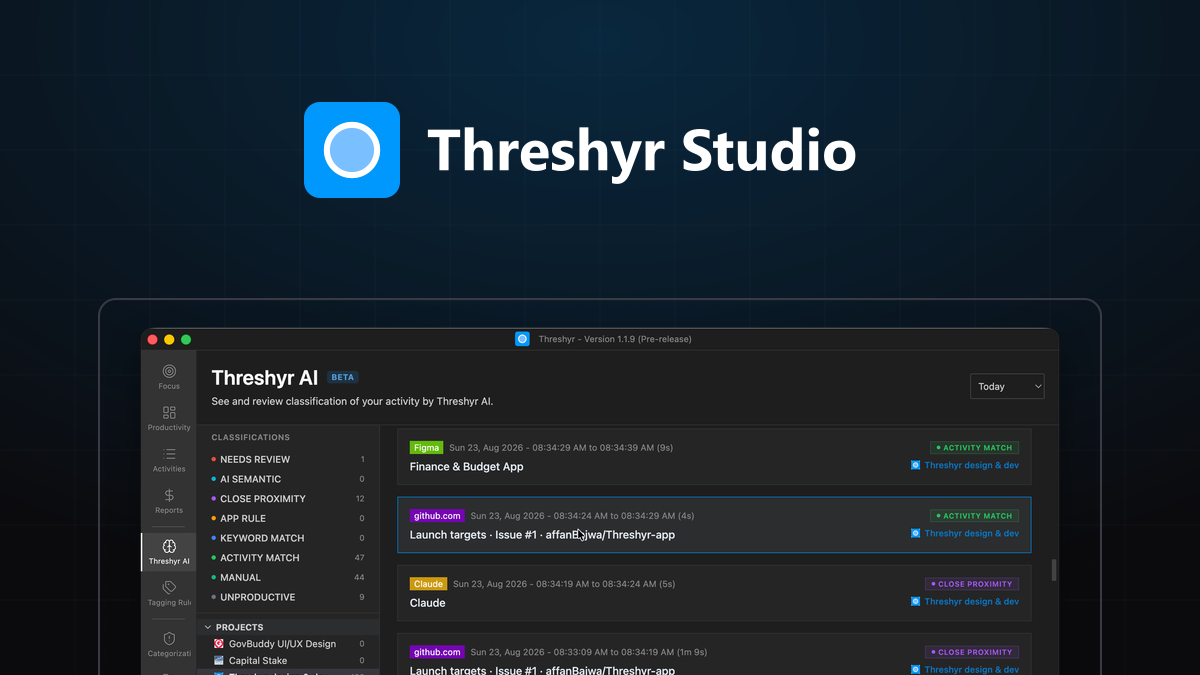
Threshyr AI takes the opposite approach: it assigns what it is confident about and deliberately holds back what it is not.
When an activity clearly matches known project patterns, Threshyr categorizes it automatically. When a window title or activity is ambiguous, Threshyr leaves the time block unassigned. Holding back uncertain time ensures your client billing totals remain strictly accurate. You are never left wondering whether a reported total includes phantom hours manufactured by automated guesswork.
How Do Your Manual Corrections Train Threshyr's Tagging Rules Automatically?
You should not have to spend hours configuring exhaustive categorization rules before an application becomes useful.
Threshyr arrives with hundreds of common applications and web domains pre-assigned into productive, neutral, and unproductive categories. When you work across specialized client projects, you simply adjust any session that was held back as unassigned.
When you assign an unassigned session to a specific project, Threshyr saves that correction as a permanent rule. The system learns the association between that client and the matching application name, website domain, or window title keywords.
Next week asks for fewer manual adjustments than this week. Over time, the software adapts to the specific rhythm of your individual workflow rather than forcing you into a generalized corporate template.
What Features Does an On-Device Local Architecture Intentionally Exclude?
Being transparent about software design means acknowledging what an on-device architecture intentionally excludes:
- No multi-device cloud synchronization: Activity recorded on your desktop does not automatically appear on your laptop.
- No central web dashboard: Your reports and timelines are viewed exclusively within the desktop application.
- No collective data harvesting: Your workflow patterns are never pooled into a central cloud database to train global models.
For teams requiring shared real-time timesheets or centralized management oversight, these limitations make Threshyr the wrong tool. But for solo professionals who prioritize speed, predictability, and data isolation, the trade-off is well worth making. If you have never audited what a tracker actually reads off your screen, what your time tracker knows about you walks through it.
What Sensitive Work Data Never Leaves Your Physical Machine?
Threshyr’s privacy boundary is absolute:
- Zero cloud accounts, logins, or passwords
- Zero remote telemetry beacons or usage tracking
- Zero keystroke logging and zero automated screenshots
- Zero network transmission of window titles, filenames, or URLs
Your operational history belongs entirely to you. You get the benefits of automated, intelligent time categorization without turning your workday into an off-site surveillance log.
Download Threshyr for Windows and macOS at /download to experience automatic, private time tracking for $29 per year during pre-release.

Written by Affan Bajwa
Founder of Threshyr. Passionate about local-first software architecture, developer productivity, and building privacy-first tools for knowledge workers.
Download Threshyr Studio
Free to use during pre-release on Windows and macOS. No account, no card, no sign-up required.
Related Articles

What Your Time Tracker Knows About You
Look at your open window titles and discover what automatic cloud time trackers quietly record, store on remote servers, and expose to third parties.


Why We Built a Local-First Time Tracker in the Age of Cloud Everything
Why we chose a local-first architecture for Threshyr, what we gave up by avoiding the cloud, and why keeping work data on your device matters.