
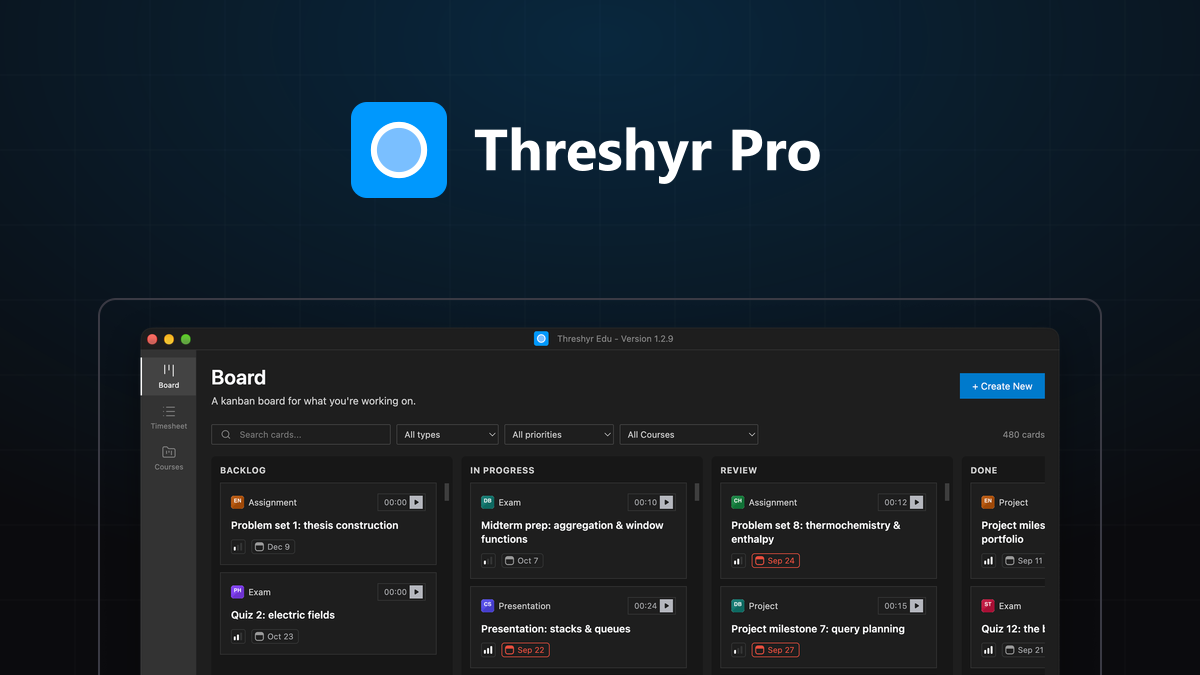
Every knowledge worker has lived through the Kanban cycle of optimism and decay.
On a fresh Monday morning, you open Trello, Linear, Jira, or Notion. You create pristine, colorful columns: Backlog, To Do, In Progress, Review, and Done. You write crisp, granular task cards for every client deliverable. For the first seventy-two hours, dragging a completed card across the board delivers an undeniable hit of dopamine.
Then reality intervenes. By week three, your board is a graveyard:
- Half the cards lingering in
In Progresswere finished ten days ago. - Three urgent client bug fixes never made it onto the board at all.
- Tasks pile up in
Donewithout any record of how long they actually took to complete. - The board feels like an embarrassing historical artifact rather than a live operational dashboard.
Why does this happen to disciplined, highly intelligent professionals? It is not a character flaw or a failure of willpower.
We stop updating Kanban boards because modern productivity tools impose an unsustainable "Two-App Tax" that separates task management from the reality of time tracking.
Here is why standalone task boards rot, and how fusing time tracking directly into your Kanban cards solves the problem permanently.
Why Do Kanban Boards Inevitably Become "Ticket Graveyards"?
Kanban boards become "ticket graveyards" because updating card states represents disconnected administrative meta-work that provides zero immediate utility when you are actively trying to execute under tight deadlines. When a task board only shows what needs to be done without directly tracking or billing the hours spent doing it, maintaining the board becomes an extra chore rather than part of the work itself.
During a normal workday, you face constant interruptions:
- An emergency client hotfix lands in your inbox.
- A staging database goes down.
- A Slack thread demands an immediate code review.
In the heat of execution, stopping to open a browser tab, find the relevant Kanban board, create a card, and drag it to In Progress feels like pointless ceremony. You dive straight into the code.
By the time you finish the fix, your attention has already pivoted to the next fire. The Kanban board is left behind, slowly desynchronizing from reality until it is completely abandoned.
What Is the "Two-App Tax" and How Does It Destroy Task Discipline?
The "Two-App Tax" is the cognitive friction and duplicated effort required to keep a project management tool (like Trello, Notion, or Linear) manually synchronized with a separate time tracking tool (like Toggl, Clockify, or Harvest).
In a typical freelance or developer workflow, every single billable task demands double data entry:
The Traditional Two-App Workflow:
1. Open Task Board -> Locate or create task card
2. Drag card to "In Progress"
3. Switch to Time Tracker app
4. Type identical task name into tracker
5. Select client and project dropdowns
6. Press Start on stopwatch
7. Work on task
8. Remember to press Stop on stopwatch
9. Switch back to Task Board
10. Drag card to "Done"
This ten-step loop creates enormous friction. If you switch tasks four or five times a day, you spend fifteen minutes simply shuttling text between two software applications that refuse to talk to each other.
Faced with this repetitive friction, human brains make a rational choice: we prioritize the work that pays our bills and skip the administrative chore of updating the board.
How Does Administrative Friction Kill Creative Momentum?
Administrative friction kills creative momentum by introducing context switching and "attention residue" at the exact moment you need deep focus to solve complex problems. Every secondary application you must configure before starting a task erodes the mental stamina required for the task itself.
Psychological research shows that reaching a state of deep flow takes up to fifteen to twenty minutes of uninterrupted immersion. When your tools force you to act as a clerical coordinator—managing two separate browser tabs just to record thirty minutes of design revisions—the mental activation energy required to begin working skyrockets.
When tools add friction, you delay starting. When starting is delayed, tasks pile up. And when tasks pile up, the visual clarity that Kanban originally promised dissolves into clutter.
Why Do Traditional Standalone Stopwatches Fail to Keep Task Boards in Sync?
Traditional standalone stopwatches fail to keep boards in sync because they operate as dumb counters with zero inherent awareness of project state, task priority, or backlog progress. A floating stopwatch only knows that sixty minutes passed; it does not know whether that hour advanced a milestone, resolved an issue, or drifted into an unassigned rabbit hole.
When you use a standalone timer:
- Timers lack visual spatial context: You see an abstract clock ticking, but you cannot visualize the surrounding backlog, upcoming deadlines, or what needs to happen next.
- Stopwatches encourage timer amnesia: Because the stopwatch lives in a separate window or system tray, you forget to start it when diving into quick work, or you leave it running over lunch.
- Reports are disconnected from deliverables: At the end of the week, you have a list of elapsed times and a separate list of completed cards, forcing you to cross-reference two conflicting datasets to build a client invoice.
Separating what you are doing (the Kanban board) from how long you are doing it (the time tracker) is an architectural failure of modern productivity software.
What Happens When Time Tracking Is Fused Directly into the Kanban Board?
When time tracking is fused directly into the Kanban board, starting a task automatically starts its timer, and completing a task automatically logs its billable hours into your invoice records, eliminating double data entry forever.
Instead of managing two disconnected tools, your visual project board is your timesheet engine:
The Fused Threshyr Pro Workflow:
[Pick Task Card on Board] -> [Click Start on Card] -> [Work] -> [Drag Card to "Done"]
└── Time automatically logged, attributed to client rate, and ready to invoice.
By unifying the task card and the timer into a single offline desktop interface—as we built in Threshyr Pro—you eliminate the Two-App Tax completely.
How Does Clicking a Card Replace the Entire Stopwatch Ritual?
Clicking a timer directly on a Kanban card replaces the entire stopwatch ritual because the task name, assigned client, and hourly billing rate are already embedded within the card metadata.
You do not need to open a separate timer app, navigate dropdown menus, or re-type "API Authentication Bugfix" for the fourth time. You open your board, see the card in your To Do column, move it to In Progress, and click start.
The tracking is an organic byproduct of doing the work, rather than an extra chore you must remember to perform.
How Does Dragging a Card to "Done" Complete Your Invoicing Timesheet?
Dragging a card to "Done" completes your invoicing timesheet by instantly aggregating all recorded sessions on that card into a finalized, client-ready billing report.
When you finish the task and move the card across the board, Threshyr Pro:
- Automatically calculates total active duration down to the second.
- Multiplies the time by that project's specific hourly billing rate.
- Updates your unbilled client balance immediately on your local dashboard.
When Friday arrives, you do not spend two hours cross-referencing git logs and calendar invites to reconstruct an invoice. Your timesheet is already built because your daily task management did the accounting for you.
How Does Fused Tracking Protect Your Visual Planning Long-Term?
Fused tracking protects your visual planning long-term by giving you a tangible financial and operational incentive to keep your Kanban board updated every single day.
When updating your board directly produces your client invoices and tracks your real earnings, maintaining the board is no longer optional overhead—it is the central engine of your business:
- Stale cards disappear: Because hours are tied directly to active cards, cards only stay in
In Progresswhile you are actively clocking time against them. - Accurate historical estimation: You can look back at completed cards and see the exact hours each deliverable required, allowing you to estimate future client proposals with empirical precision rather than optimistic guesswork.
- Zero cloud dependency: With a native offline desktop tool like Threshyr Pro, your client lists, task descriptions, and billing rates live in a private SQLite database on your machine—never exposed to remote servers or subscription paywalls.
Ready to Keep Your Kanban Board Alive and Stop Wasting Time?
You do not need more discipline to maintain your task board; you need software that respects your cognitive bandwidth and stops forcing you to manage two separate tools.
Stop paying the Two-App Tax. Bring your visual task planning and client time tracking together on a single offline desktop screen.
Download Threshyr Pro completely free from the Microsoft Store and experience a Kanban board that tracks your hours, calculates your billing, and stays alive all semester long.

Written by Affan Bajwa
Founder of Threshyr. Passionate about local-first software architecture, developer productivity, and building privacy-first tools for knowledge workers.
Track your time automatically. Without the cloud.
No timers to click. No cloud tracking. Your private window titles and project logs stay on your machine forever.
Available for Windows & macOS • Pre-release at $29/yr
Related Articles

Does Time Tracking and Kanban Really Need to Be Two Separate Apps?
Why do we pay two SaaS subscriptions to manage tasks in Trello and track hours in Toggl? Compare the dual-tool stack with a unified, offline Kanban workflow.


Why Use Threshyr Studio When I Can Vibe Code a Time Tracker for Myself?
Vibe coding a time tracker in Cursor sounds like a fun weekend project until you hit OS edge cases. Here is what building a local tracker actually takes.