

Every semester begins with the exact same illusion: you look at your new class schedule, see fifteen hours of weekly lectures with vast open gaps between Tuesday and Thursday, and assume you have an abundance of free time.
By week five, reality hits. Two midterms land on the same Thursday, a lab report is due Friday morning, an annotated bibliography needs twenty sources by midnight, and you are running on caffeine while guessing which subject you can afford to neglect today.
The standard advice given to college students is to "manage your time better" or "build a study routine." But generic time management fails in university because coursework demands are fundamentally unequal. A three-credit organic chemistry class does not consume the same cognitive energy or hours as a three-credit sociology elective. When you treat all courses as identical blocks on a calendar, the loudest deadline always cannibalizes the rest of your semester.
To survive a demanding academic term without burning out, you do not need more willpower. You need a course-based time budget.
The Myth of the Flat Study Schedule
Most students organize their academic week by schedule blocks: "I will study from 6:00 PM to 10:00 PM every weeknight."
While dedicated study blocks are well-intentioned, a flat schedule has a dangerous blind spot: it measures aggregate time, not resource allocation.
When you sit down for four hours without a course budget, human psychology takes over. You instinctively gravitate toward one of two extremes:
- The Comfort Trap: You spend three hours polishing an introductory assignment for a class you already understand because it feels satisfying and low-friction.
- The Panic Trap: An intimidating project in your hardest course creates acute anxiety, so you sink all four hours into it while completely missing the reading assignments for your other three subjects.
At the end of the week, you feel exhausted and can truthfully claim you studied twenty hours. Yet your grades slip because sixty percent of that time went into a single class, leaving core foundational subjects starved of attention.
A course-based budget flips the equation. Instead of asking "How many hours can I study tonight?", you ask: "How many hours does each individual course require this week to stay on top of the curve?"
Calculating Your Baseline Course Ratios
Academic credit hours are nominally based on the Carnegie Unit: one hour of lecture plus two to three hours of independent study per week. In practice, real course loads vary wildly:
- Heavy Problem-Set Courses (Physics, Calculus, Engineering): Require continuous problem drills that frequently demand a 3:1 or 4:1 study ratio.
- Reading & Writing Heavy Seminars (History, Literature, Law): Require sustained reading comprehension and drafting blocks, usually at a 2:1 or 3:1 ratio.
- Project/Studio Courses (Computer Science, Architecture, Design): Tend to have low weekly demands early in the semester, followed by intense 20-hour build crunches before project milestones.
- Survey Lectures: Can often be maintained cleanly with a 1:1 or 1.5:1 ratio of review and note consolidation.
The 35-Hour Academic Ceiling
Before assigning hours to classes, establish an honest weekly ceiling. Treat university like a rigorous full-time job: 35 to 45 total hours per week (including lectures and labs).
If you are enrolled in 15 credit hours (15 hours in lecture), that leaves 20 to 25 hours of outside study time per week to divide across your courses.
A realistic course budget for a 5-class schedule might look like this:
| Course | Credits | Target Weekly Study Hours | Primary Focus |
|---|---|---|---|
| CS 201 (Data Structures) | 4 | 7.5 hrs | Programming assignments & test suites |
| MATH 215 (Linear Algebra) | 3 | 6.0 hrs | Problem sets & concept review |
| PHYS 140 (Classical Physics) | 4 | 6.0 hrs | Lab reports & weekly problem drills |
| ENG 125 (College Writing) | 3 | 3.5 hrs | Essay drafting & peer edits |
| ECON 101 (Intro Microeconomics) | 3 | 2.0 hrs | Lecture review & quiz prep |
| Total Outside Study | 17 | 25.0 hrs | — |
Notice that the numbers are deliberate. CS 201 and Linear Algebra receive more than half of the entire weekly study budget. ECON 101 receives only two focused hours because lecture review and practice quizzes suffice.
When a course hits its weekly target, you earn the permission to stop studying it without guilt.
Setting Up Course Tracking in Threshyr Edu
A budget is useless if you have no idea whether you are sticking to it. But tracking study time should never become a chore in itself or invite digital distractions.
This is why we built Threshyr Edu—a dedicated, distraction-free desktop tracker designed specifically for students, researchers, and coursework. It is completely free forever, contains zero advertisements, requires no cloud login, and lives quietly on your PC.
Here is how to set up your semester in Threshyr Edu:
1. Add Your Courses
Create a separate entry for each course on your syllabus (e.g., CS 201, MATH 215, PHYS 140). Threshyr Edu supports unlimited courses, so you can separate lab sections or independent study credits into their own distinct buckets.
2. Track Tasks Deliberately
When you sit down to work on a class, click start on the relevant course and assign a clear task label:
MATH 215: Problem Set 4PHYS 140: Lab 3 Error PropagationCS 201: Binary Search Tree Implementation
Because Threshyr Edu is a focused desktop application, starting a timer represents an intentional commitment to that single subject.
3. Review Your Friday Timesheets
At the end of the week, open the Timesheets view in Threshyr Edu. You will see an exact breakdown of how many hours were logged against each course.
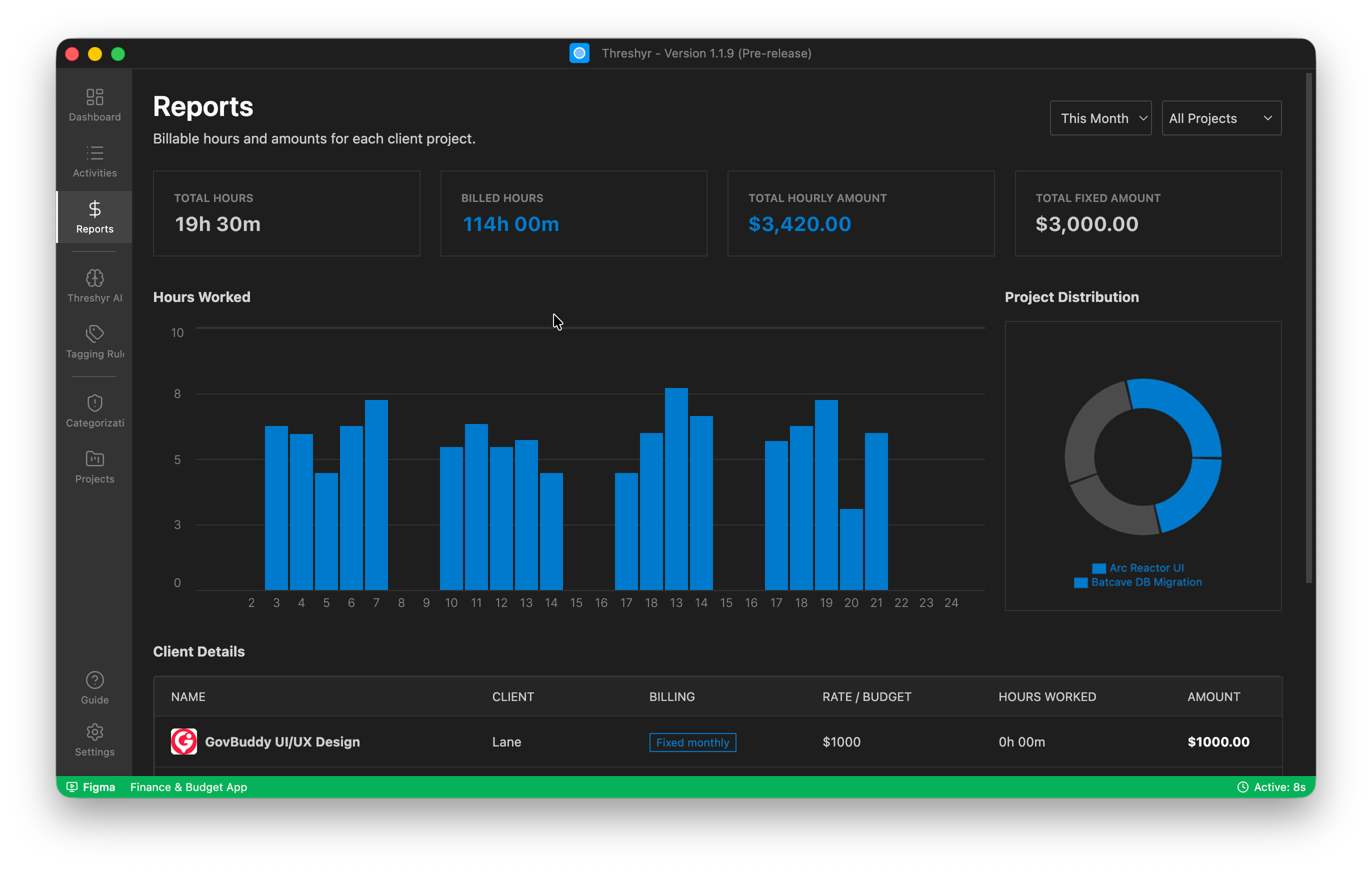
Compare your logged hours against your target budget:
- Did Linear Algebra take 9 hours instead of 6? You now know that eigenvalues require more cognitive ramp-up than expected.
- Did Physics only receive 2 hours because an essay took over your weekend? You can spot the deficit immediately and balance it before the midterm catches you off guard.
The Burnout Cutoff: Knowing When to Close the Laptop
The most insidious cause of student burnout is not studying ten hours on a busy day; it is the feeling that you should always be studying.
When you track hours against a course budget, studying shifts from an endless emotional obligation into a bounded operational task. When you see that you have logged your allotted 7.5 hours on Data Structures and your code passes the unit tests, your work for that class is complete for the week.
You close your laptop with a clear conscience. You do not spend your Friday evening with residual guilt in the back of your mind, because your timesheet proves you did the work.
Take Control of Your Semester
University coursework expands to fill whatever time you give it. Without a course-based budget, your easiest classes will waste your afternoons while your most challenging courses push you toward 2:00 AM panic sessions.
Set up an honest weekly budget, track your subjects with clean desktop timesheets, and audit your real study hours before the semester controls you.
You can download Threshyr Edu for Windows completely free from the Microsoft Store with no subscription, no credit card, and zero cloud tracking.

Written by Affan Bajwa
Founder of Threshyr. Passionate about local-first software architecture, developer productivity, and building privacy-first tools for knowledge workers.
Track your time automatically. Without the cloud.
No timers to click. No cloud tracking. Your private window titles and project logs stay on your machine forever.
Available for Windows & macOS • Pre-release at $29/yr
Related Articles
Credit Hours vs Reality: Auditing How Much Time Your Degree Actually Takes
Universities claim that every credit hour requires 2–3 hours of outside study. Here is how to audit your real coursework hours using Threshyr Edu timesheets.

Why Med and Law Students Are Ditching Gamified Phone Timers for Desktop Tracking
Why studying for the USMLE, Bar Exam, or MCAT demands moving away from gamified mobile timers toward distraction-free desktop tracking with Threshyr Edu.